Game Guides
Roblox Scams: How Parents Spot Fake Codes and Report Them
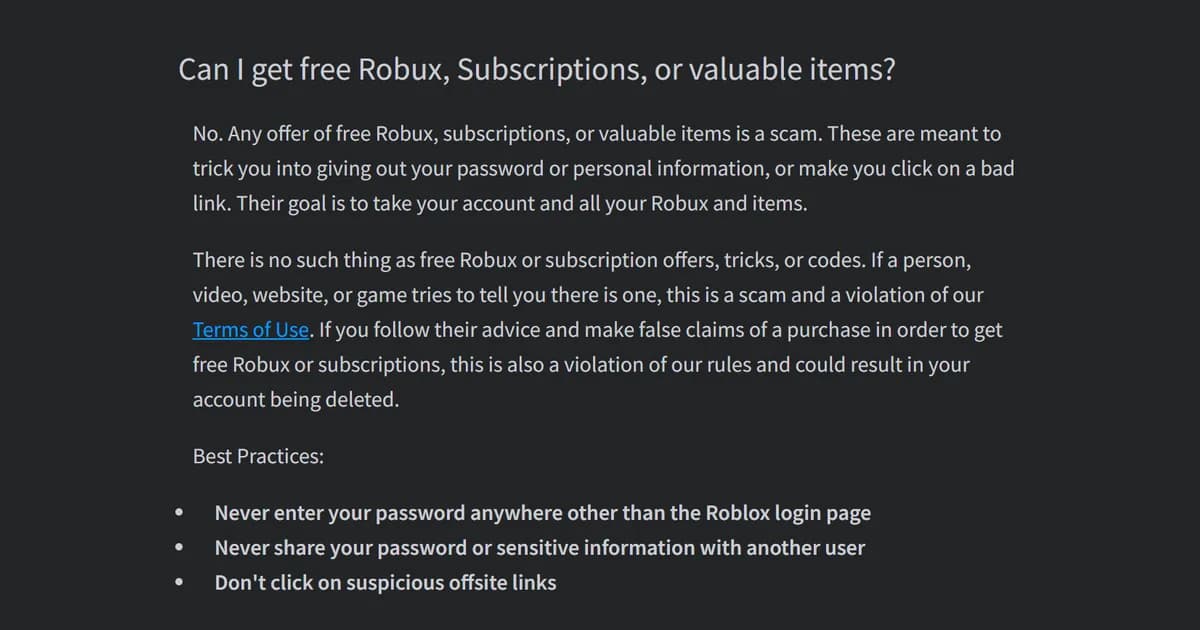
Every offer of free Robux is a scam, and Roblox says so in plain words. So the useful question about Roblox scams is not "is this one real?" but what to do when your child sees one: report it, then lock the account down.
Checked October 20, 2026 against Roblox Support and Roblox's own safety pages. We did not test these steps on a child's account.
TL;DR: Treat any free Robux, free code or "giveaway" that asks for a password as a scam, and report the exact message. Then turn on 2-Step Verification and, if your child is under 13, set a spending limit.
What parents need to know:
- Roblox says employees "will never ask for your login information."
- Official promotions show up on Roblox's blog, the Notifications tab or a banner on the site.
- Roblox's Parental Controls let you "set a monthly spending limit." The default is no limit.
Key Takeaways
- No free Robux exists. Roblox Support: "There is no such thing as free Robux or subscription offers, tricks, or codes."
- The goal is the account. Roblox: "Their goal is to take your account and all your Robux and items."
- The most common way to lose an account is sharing login details or filling out online surveys, Roblox says.
- Report the message, not just the user. A report from a profile page alone does not show moderators what happened.
- 2-Step Verification stops a stolen password from working. Roblox recommends the authenticator app option.
- Lost items may not come back. Roblox does not promise to restore a hacked account or a scam trade.
Overview: what Roblox scams look like
Roblox scams promise something for nothing. Roblox Support lists the bait as free Robux, subscriptions or valuable items. It says such offers are "meant to trick you into giving out your password or personal information, or make you click on a bad link."
The offer can come from anywhere. Roblox names "a person, video, website, or game." Its safety page adds the same warning for "free Premium memberships, tricks, codes, or valuable items."
Roblox's own pages name four warning signs:
- The password ask. Roblox: "We'll never ask for your password outside of the Roblox login page."
- The fake admin. Someone who claims to be Roblox staff but has no Roblox Admin badge in their badge list.
- The link off Roblox. Roblox's Help Center warns that any link "that contains spaces or unusual characters, or is to a site you are not familiar with should not be trusted, even if you know the user who sends it to you."
- The fake form inside a game. If a game asks for login details, "even if it looks like an official Roblox request, leave the experience."
Outside games, the UK's National Cyber Security Centre has a name for the link trick. Phishing is when attackers send scam emails or texts "that contain links to malicious websites."
Trades are a fifth trap. Roblox's trading guide names its official Trade and Sell features as the only safe ways to swap items or Robux. It says to treat "every other method as unsafe." One deal it tells players to avoid: lending out an account or items.
Real promotions come from Roblox itself. The Help Center says official ones are announced on Roblox's blog, in the Notifications tab of Messages, or in a banner at the top of the site.
Desk note: When we checked Bubble Gum Simulator on Oct 10, one code site listed 141 "active" codes. The developer's own game page listed two. That gap is the whole problem: a list that looks official is not the same as the developer's page. Our Bubble Gum Simulator codes page lists the developer's two.
Step-by-Step: what to do when your child sees a scam
1. Don't click, don't answer. Roblox's advice for a stranger's off-site link is short: "Do not click and report the user." Roblox puts the same rule more broadly: "Don't click on suspicious offsite links."
2. Report the exact message. Roblox asks for the specific chat, private message or game to be reported. "If you just report a user from their profile page, our moderators won't be able to see what they did wrong."
In a game, the steps are:
- Open the menu at the upper left of the screen.
- Select the flag next to the player's name, or the Report tab.
- Choose Person, pick the username, then the reason.
- Add a short description and select Submit.
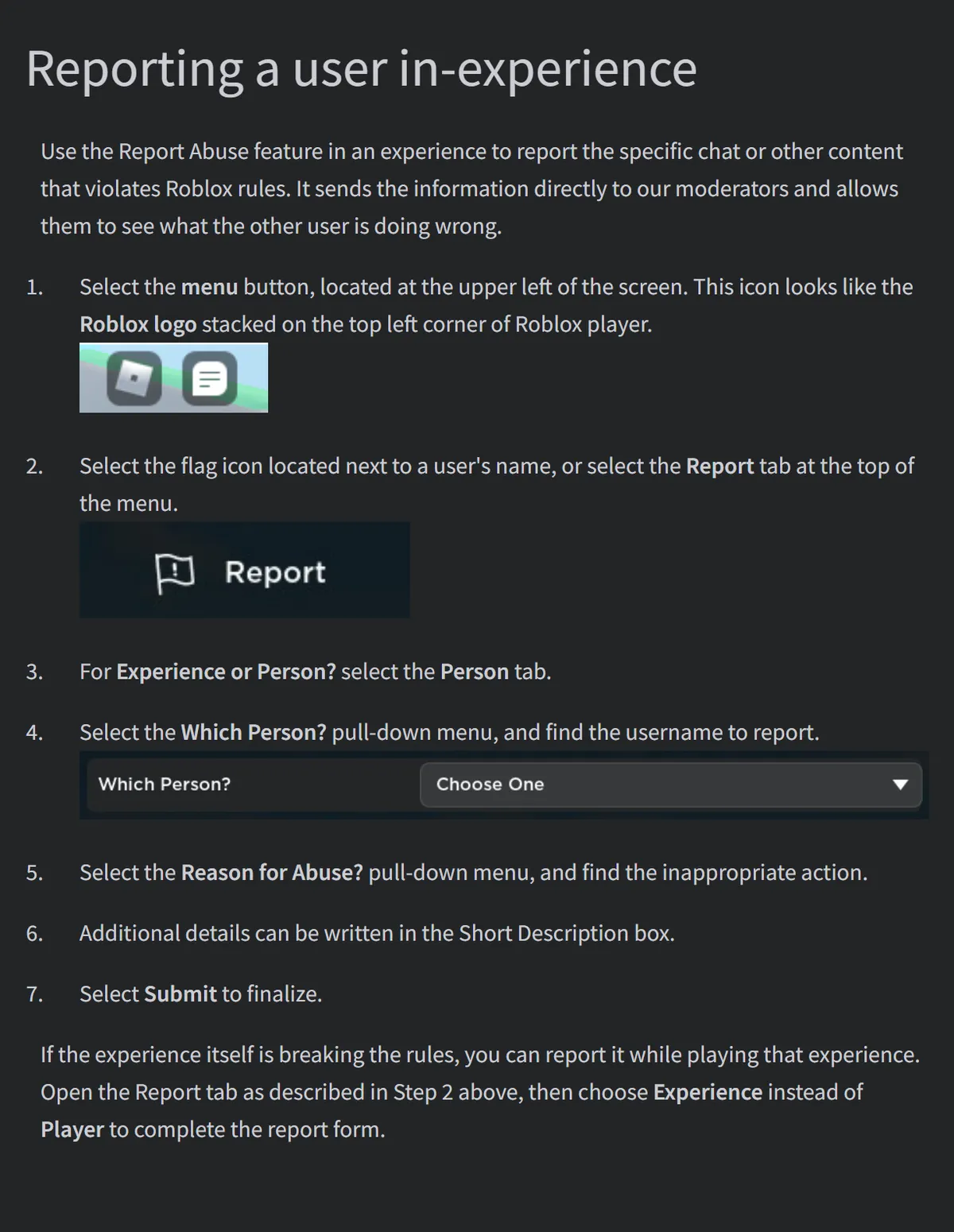 Image: Roblox Support, How to Report Rule Violations (screenshot, Oct 20)
To report a whole game, Roblox points to the red Report Abuse button on the game's About page. To stop the messages, you can also block the user. Roblox says blocking works on players who are "harassing, bullying, or spamming your child."
3. If a password was typed in, start Roblox's recovery steps. They come in this order:
- Remove malware and any browser extensions installed. Roblox: "You will need to get rid of any malware before recovering your account."
- Reset the password to one that is "secure and isn't easy to guess."
- Turn on 2-Step Verification under Settings, then Security.
If the reset fails, contact Roblox Support. To prove the account is yours, Roblox asks for the first email address added to it, or the billing email of the very first payment. Keep that email somewhere you can find it.
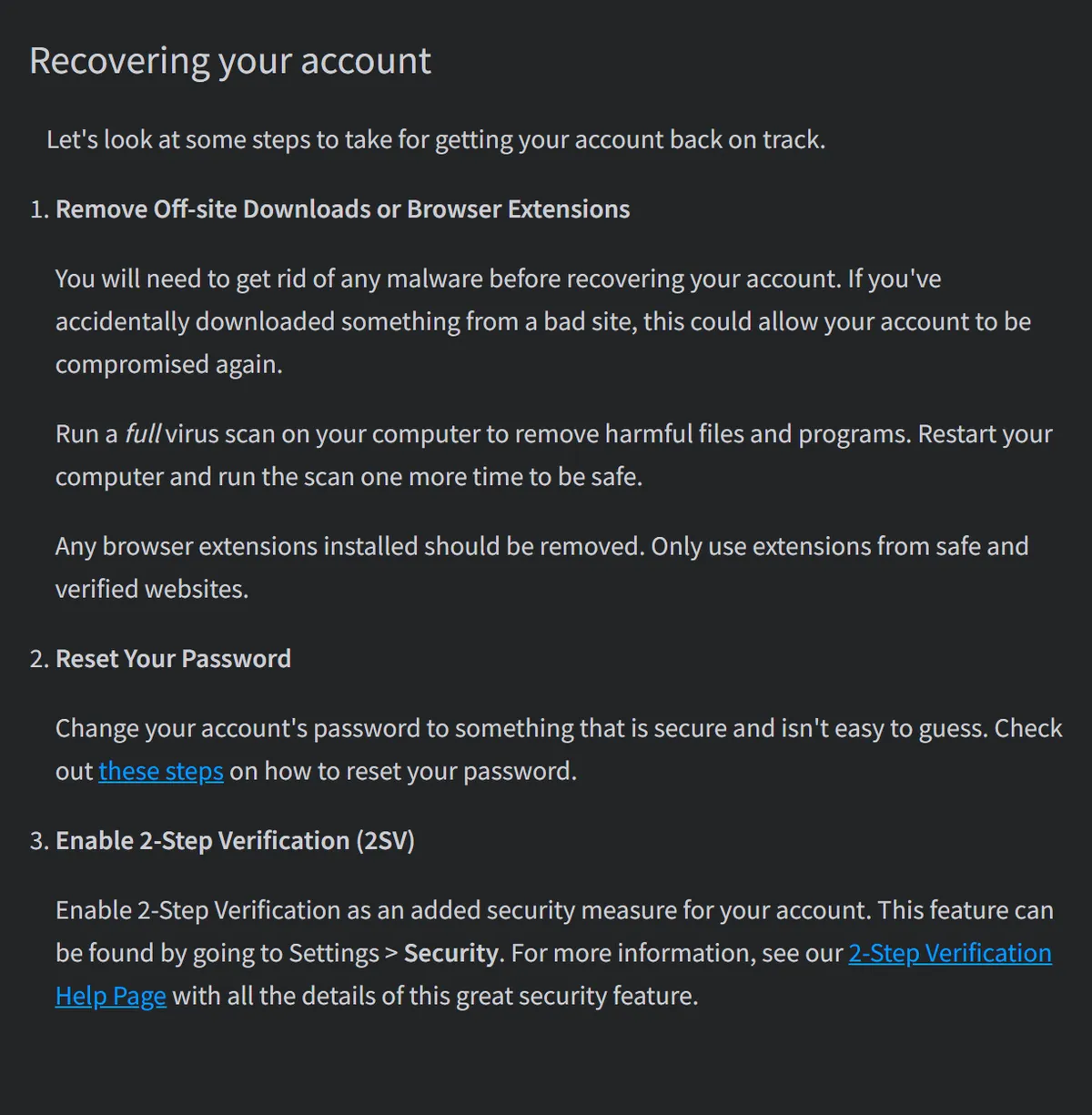 Image: Roblox Support, My account was hacked (screenshot, Oct 20)
4. Know the deadline. Roblox says owners who want help with a compromised account "must contact Roblox within 30 days of compromise." Unless the law requires it, Roblox says it is "under no obligation to assist" hacked accounts, and it does not guarantee lost items or currency come back. Don't wait.
Tips: account settings that make scams fail
Turn on 2-Step Verification. Roblox says it "makes it so no one else can login to the account even if they know the password." You need a verified email first. Roblox recommends the authenticator app option.
Save the backup codes. Roblox shows them once: "you can only see them this one time." Write them down somewhere your child can't lose.
Deny a login you didn't start. If a 2-Step prompt appears and nobody in the house was logging in, Roblox says to deny it. "This means that someone might have your password."
Check whose email is on the account. Roblox: "The only email address you should have verified under your account page is your own or a parent's." Another person's email there gets the password reset emails.
Skip browser extensions that promise Roblox extras. "Roblox does NOT create browser extensions," its Help Center says in capitals.
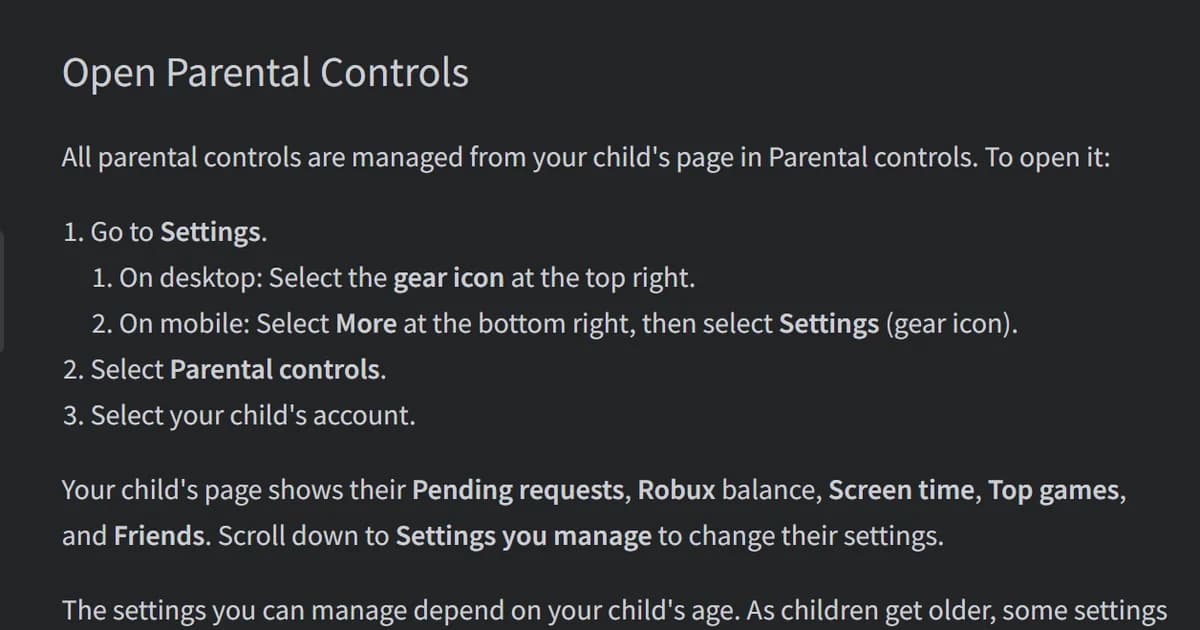
For under-13s, set the money controls. A linked parent account can set a monthly spending limit from 0 to 10,000 in your currency; the default is "No limit." It stops applying when your child turns 13, and Roblox says it may not apply on certain consoles. Our Roblox parental controls guide walks through linking an account.
Set Robux transfers to "Always ask." Children can send Robux to trusted friends. By default Roblox caps that at 500 Robux a day and 1,000 a month, and the caps rise if your child turns on 2-Step Verification. With "Always ask," you approve every transfer.
Desk note: Our math from Roblox's default caps: if approvals are set to "Always allow for trusted friends," up to 1,000 Robux a month can leave without you approving each one. With "Always ask," nothing leaves until you say yes.
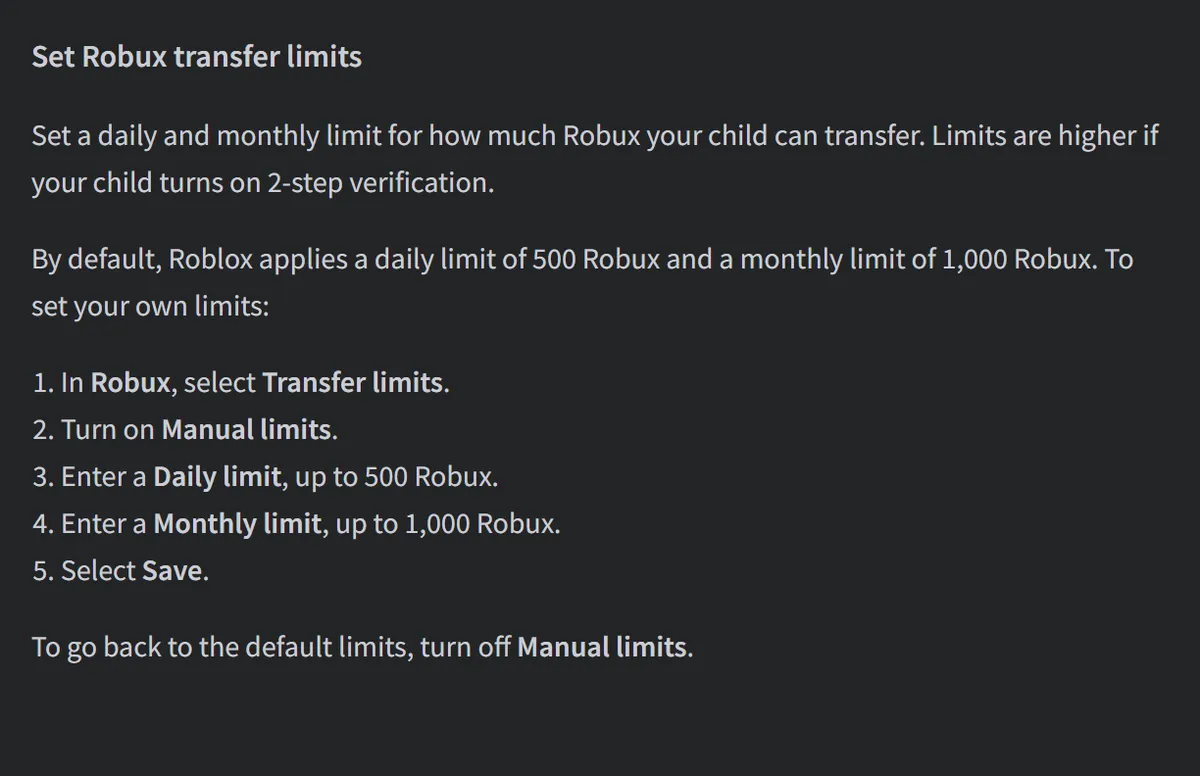 Image: Roblox Support, Parental Controls Overview (screenshot, Oct 20)
Outside Roblox, the US Consumer Financial Protection Bureau suggested in 2024 that parents "consider a gift card or other option to block surprise overcharging." That is a general money tip, not a scam fix.
What players are saying
Players see the phishing side. "I get emails of people trying to scam me or get into my account all the time," one long-time player wrote (Reddit, Oct 14).
Trade scams change shape. In a developer Q&A thread, a player asked about scams in trading and mentioned "a new one called “draw your avatar” that’s becoming common in certain games" (Reddit, Oct 10).
Our take
Report every free Robux offer, then switch on 2-Step Verification tonight. Roblox says employees never ask for a login, and its safety page lists "Requesting your password" as a red flag. Help is also time-limited: Roblox wants a compromised account reported within 30 days.
For parents of under-13s, the spending limit and "Always ask" on transfers cap what can be spent and what can be sent. If your child plays games that sell a lot, our list of Roblox games with few in-game purchases is a calmer place to start.
What we don't know yet: We found no figure from Roblox on how many accounts are lost to scams, and no Roblox page on reporting a scam website outside Roblox. Report the message or game on Roblox itself.
Our view, from the sources in this article.
How we checked this
We read 8 Roblox Support articles through Roblox's Help Center, and Roblox's Avoiding Frauds & Scams page. We added a 2024 consumer advisory from the US Consumer Financial Protection Bureau and the UK National Cyber Security Centre's phishing guidance. Player comments come from public r/roblox threads, read through the Arctic Shift archive; we do not name players. The screenshots are of Roblox Support pages, taken on Oct 20. We did not test these settings on a child's account, and we do not name or link scam sites. All 48 sources are in our source file. Last reviewed October 20, 2026.
Related Reading
- Roblox Games for Younger Kids: 11 Suitable for Everyone: popular games with Roblox's gentlest label.
- Creative Roblox Games for Kids: 7 Picks to Build and Design: building and design games from the chart, with age labels.
- Anime Vanguards Codes (October 2026): 12 Live, 7 End Oct 23: what a code list copied from the developer's own channel looks like.
Frequently Asked Questions
Is free Robux real? No. Roblox says every such offer is a scam.
Where do I report a scammer? In the game menu, under Report, with the exact chat selected.
Does Roblox ask for passwords? Never outside its own login page or apps.
My child's account was hacked. What first? Remove malware, reset the password, turn on 2-Step Verification, then contact Roblox within 30 days.
Will Roblox return items lost in a scam trade? Roblox says it can't enforce deals made outside Trade or Sell.
References
- Roblox Support: Free Robux or Subscription Generators
- Roblox Support: Keep Your Account Safe
- Roblox Support: How to Report Rule Violations
- Roblox Support: My account was hacked, what do I do?
- Roblox Support: Add 2-Step Verification to Your Account
- Roblox Support: How to avoid trading scams
- Roblox Support: Parental Controls Overview
- Roblox Support: Safety Features, Chat, Privacy and Filtering
- Roblox: How to Avoid Identity Fraud, Scams, and More
- CFPB consumer advisory on video games and children's spending (Aug 28, 2024)
- UK National Cyber Security Centre: Phishing
Was this guide helpful?
About the author

The ObbyDesk desk
We read the update notes, check Roblox's own numbers, do the math and tell you what's worth your time. We don't play-test games for our articles, and when we can't confirm something, we say so.
Keep reading
Roblox Parental Controls: Spending Limits, Chat, Screen Time
Game Guides · 11 min
Roblox Games With Few In-Game Purchases: 8 Picks (2026)
Lists · 8 min

Creative Roblox Games for Kids: 7 Picks to Build and Design
Lists · 7 min
Roblox Games for Younger Kids: 11 Suitable for Everyone
Lists · 9 min
The Strongest Battlegrounds Guide: Controls and Characters
Game Guides · 7 min
Bubble Gum Simulator INFINITY Halloween 2026: Part 2 Dates
Game Guides · 5 min
Roblox The Hollow Event: October 22 Date and What's Known
Lists · 5 min
Anime Vanguards Codes (October 2026): 12 Live, 7 End Oct 23
Game Guides · 7 min
Independent, no ads
ObbyDesk is not affiliated with, endorsed by or sponsored by Roblox Corporation or any game developer, and nobody pays for coverage. There are no ads and no affiliate links. Codes come only from the developer's own channels. We write with AI tools and match every fact to its source before it goes up. Prices, odds and event dates change with updates, so check the game itself before you spend Robux. More on our independence, how we check and how we use AI.